

Around 85% of business emails are filtered before reaching inboxes due to poor sender signals and trust issues. Domain reputation decides if messages reach inbox or spam. It affects visibility, response rates, and overall success of email outreach campaigns across different providers and industries.
Domain reputation can be checked using tools like Google Postmaster, Talos, MXToolbox, Spamhaus, Sender Score, Barracuda, Microsoft SNDS, and email service dashboards. These platforms show spam rates, blacklist status, engagement signals, and delivery performance.
Read to learn what impacts reputation and how to improve it for better cold email outreach results and stronger B2B engagement.
Domain Reputation and Its Role in Email Deliverability
Domain reputation is a score that email providers assign to a sending domain. It reflects how recipients interact with messages and how the domain behaves over time.
Email systems track spam reports, bounce rates, and engagement signals like opens and replies. This score plays a major role in the success of cold email outreach because inbox placement affects visibility and response rates. A strong reputation helps messages reach inboxes, in contrast, a weak score sends emails to spam or blocks them.
Each sending action adds data to this score, so consistent sending habits matter for long-term delivery results. Internet service providers use this score to filter incoming campaigns.
Domain reputation has an important role in email deliverability. The score:
- Improves inbox placement for marketing and outreach campaigns.
- Reduces chance of messages landing in spam folders.
- Builds trust with email service providers over time.
- Supports higher response rates for cold outreach efforts.
- Helps maintain consistent delivery performance across long campaigns.
Also read: Why most cold emails fail and how to fix them.
Most Important Metrics for Measuring Domain Reputation
Domain reputation depends on measurable signals that email systems track across campaigns. These metrics show sending health, user reaction, and inbox performance across different providers and mailing lists tracking data. Most important metrics for measuring domain reputation:
- Spam complaint rate: Share of recipients marking messages as spam above 0.3% risk level.
- Bounce rate: Failed deliveries exceeding 2% signals poor list hygiene.
- Open rate: Around 20% or more shows healthy audience engagement.
- Click rate: Near 2% indicates strong interest in content.
- Delivery rate: Below 95% reaching inbox suggests deliverability issues.
- Unsubscribe rate: Above 1% shows mismatch between content and audience.
- Blacklist listings: Even one listing on blocklists harms sending reputation.
How to Check Your Domain Reputation
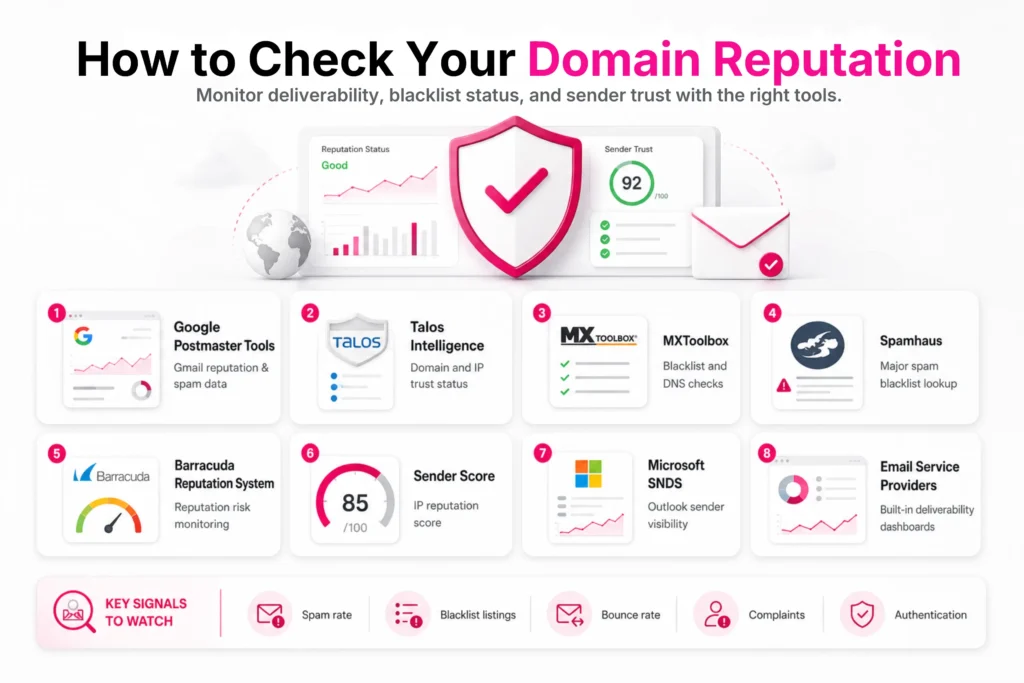
Domain reputation can be reviewed using several monitoring tools that show deliverability, blacklist status, and sender trust signals clearly. Popular ones include:
Google Postmaster Tools
Google Postmaster Tools shows how Gmail treats a sending domain across its systems. It provides data on spam rate, domain reputation, IP reputation, authentication status, and delivery errors. Users can view daily trends that reflect inbox performance inside Gmail.
It also reports feedback from users marking emails as spam. This identify issues with list quality, content relevance, and sending behavior. Email teams use this tool to adjust campaigns and improve delivery results inside Gmail environments over time.
Talos Intelligence
Talos Intelligence from Cisco reviews domain and IP reputation using global threat data. It classifies senders based on email traffic behavior, spam history, and links to harmful activity. Results show reputation status such as good, neutral, or poor.
It also tracks changes over time to detect shifts in trust level. Security teams use it to identify risks in outbound email systems. It detects if a domain is linked with abuse patterns or suspicious sending networks that affect deliverability across providers.
MxToolbox
MxToolbox checks domain reputation through blacklist monitoring and email diagnostics. It scans if a domain or IP appears on major spam databases. It also reviews DNS, SPF, DKIM, and DMARC records for proper setup. Misconfigured authentication or blacklist presence signals delivery risk.
The tool generates a health report showing warnings and pass status. Email managers use it to fix technical issues that impact inbox placement. It also helps identify server problems that reduce trust from mailbox providers.
Spamhaus
Spamhaus is a global authority that maintains blocklists of spam sources and abusive domains. Email providers rely on it to filter harmful messages. A listing can stop emails from reaching inboxes across many systems. Users can check domain or IP status directly through its lookup system.
If issues are resolved, removal requests can be submitted. Continuous monitoring helps prevent long-term reputation damage. It plays a major role in protecting inbox systems from bulk spam and malicious sending behavior.
Barracuda
Barracuda Reputation System evaluates domains and IPs using email traffic data and threat signals. It checks spam traps, complaint rates, and unusual sending patterns. Based on this, it assigns reputation scores that influence email filtering decisions.
Poor scores may lead to message blocking or spam filtering. The lookup tool shows current status and risk level for a domain. Email administrators use it to understand delivery failures and improve sender behavior for better inbox acceptance across Barracuda-protected systems.
Sender Score
Sender Score from Validity rates sending IP reputation on a scale from 0 to 100. Higher scores indicate stronger trust and better deliverability chances. It uses data such as spam complaints, unknown user rates, and spam trap hits.
Email marketers use this score to evaluate sending performance and compare IP quality. Changes in score reflect list health and engagement levels. Monitoring it helps improve outreach strategy, reduce risk, and maintain stable inbox placement across email campaigns.
Microsoft SNDS
Microsoft SNDS provides visibility into how Outlook and Hotmail treat a sending IP. It shows spam complaint rates, message volume, and filtering behavior across Microsoft systems. Users can see if their IP is throttled, blocked, or flagged for poor sending habits.
The dashboard also reflects traffic patterns and delivery performance. Email teams use it to detect issues affecting inbox placement in Microsoft environments. Regular monitoring helps maintain strong delivery rates and prevents reputation decline over time.
Email Service Providers
Many Email Service Providers include built-in reputation dashboards. These platforms track bounce rates, spam complaints, and engagement metrics across campaigns. They generate internal reputation scores that influence delivery success.
Users can access logs, delivery reports, and suppression data for troubleshooting. Alerts notify teams about sudden reputation drops. These insights improve list quality, sending behavior, and campaign structure. Strong monitoring inside ESPs supports consistent deliverability for cold email outreach and marketing campaigns.
Manual Inbox Placement Testing
Another practical way to assess domain reputation is by sending test emails to your own accounts across different email providers, such as Gmail, Outlook, and Yahoo. While this method does not generate a reputation score, it shows how mailbox providers currently treat emails sent from your domain.
If your emails consistently land in the primary inbox, it usually indicates that your domain has a healthy reputation. However, if they frequently appear in the spam or promotions folder, it may signal reputation or authentication issues. I recommend using this manual check alongside reputation monitoring tools to get a more complete view of your domain’s email health.
What Can Affect Your Domain Reputation?
Things that affect domain reputation include:
- Spam complaints: High complaint rates signal unwanted emails and reduce sender trust quickly across providers.
- High bounce rate: Frequent failed deliveries show outdated lists and damage overall sending reputation.
- Email volume spikes: Sudden sending increases appear suspicious and trigger filtering systems at providers.
- Poor list quality: Old or scraped contacts lead to weak engagement and higher spam marking.
- Blacklist status: Being listed on blocklists blocks emails and harms domain trust across networks.
- Authentication issues: Missing SPF DKIM or DMARC records reduce acceptance and increase filtering risk.
- Low engagement: Few opens or clicks indicate weak interest and lower inbox placement rates.
- Spam traps: Sending to spam trap addresses signals list harvesting or poor hygiene practices.
- Content quality issues: Misleading wording or excessive links often trigger spam filters and penalties.
- IP reputation: Poor IP history reduces trust and directly affects email delivery success.
Indicators of Poor Domain Reputation Health
Domain reputation health shows how email providers judge your sending behavior. These are indicators of poor domain reputation health:
- Spam folder placement: Emails consistently landing in spam folders indicate serious trust issues with mailbox providers and filtering systems.
- Low open rates: Very few recipients opening emails signals weak interest and reduces sender credibility over time.
- High bounce rates: Many undelivered emails suggest outdated contact lists and damage overall domain trust signals quickly.
- Spam complaint spikes: Increased user reports marking emails as spam heavily reduces reputation across major email platforms.
- Blacklist presence: Domain listed on blocklists leads to delivery blocking and severe inbox placement problems across networks.
How to Improve Your Domain Reputation for Better Email Delivery
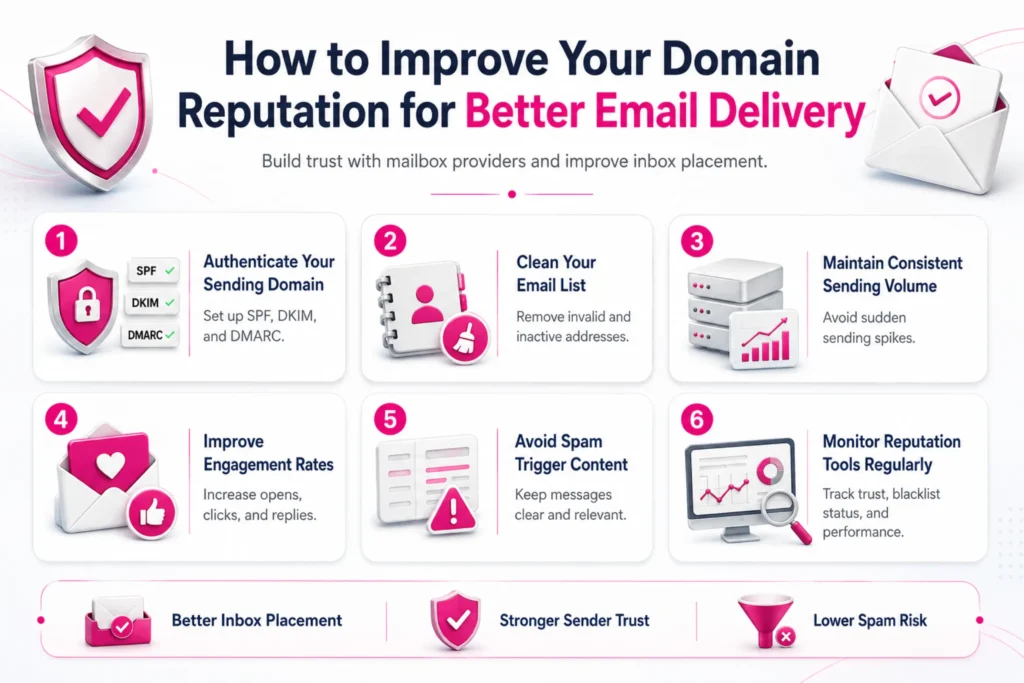
Domain reputation improvement is crucial for trusted email delivery and strong inbox placement results. To improve it, you must:
Authenticate Your Sending Domain
Setting up SPF, DKIM, and DMARC builds trust with mailbox providers. These records confirm that emails truly come from your domain and prevent spoofing attempts.
Proper authentication reduces spam filtering and improves inbox placement across major providers like Gmail and Outlook. It also helps email servers verify message integrity during transmission. Without correct setup, even legitimate emails can be flagged as suspicious. Contact us to authenticate your cold email sending setup.
Clean Your Email List Regularly
Remove invalid, inactive, or fake addresses to maintain strong list quality. High bounce rates damage domain trust and reduce deliverability. Cleaning lists ensures emails reach real users who are more likely to engage with content. Strong list hygiene also supports quality B2B lead generation because outreach reaches relevant prospects instead of unresponsive or inaccurate contacts.
Maintain Consistent Sending Volume
Stable sending patterns help mailbox providers recognize normal behavior from your domain. Sudden spikes in email volume often trigger spam filters and reduce trust. Gradually increasing outreach builds a safer reputation over time.
Consistency also improves engagement tracking and reduces suspicion from filtering systems. Avoid long gaps followed by bulk sending, since this disrupts sender history. Predictable sending schedules support better inbox placement and strengthen long-term domain credibility.
Improve Email Engagement Rates
Higher open and click rates signal that recipients find your emails useful and relevant. Poor engagement leads to filtering and reduced inbox placement. Personalization and relevant messaging improve response rates and strengthen trust.
Removing inactive contacts improves overall metrics. Strong engagement patterns support long-term deliverability improvements and help maintain consistent inbox performance across campaigns and audiences.
Avoid Spam Trigger Content
Certain words, excessive links, or misleading subject lines can activate spam filters. Keeping messages clear, simple, and relevant reduces filtering risk. Overly promotional language often lowers trust with mailbox providers.
Balanced formatting and natural tone improve deliverability outcomes. Content quality plays a major role in inbox placement decisions. Regular testing ensures messages remain compliant with filtering rules and maintain strong domain reputation.
Monitor Reputation Tools Regularly
Tracking domain reputation through tools like Google Postmaster, Talos, and Sender Score helps detect issues early. These platforms show spam rates, blacklist status, and delivery performance.
Review reputation metrics at least once each week for steady email activity. Consistent monitoring supports better decisions and maintains stable inbox placement across different email environments.
Also read: What are the benefits of email deliverability services?
Final Thoughts
Domain reputation controls how email providers treat your messages across inbox systems. It depends on sending behavior, engagement levels, and technical setup. Strong reputation improves inbox placement and response rates. Regular monitoring, clean lists, and stable sending practices maintain long-term email performance and reliable communication results.
We manage list quality, sending structure, and campaign setup to protect domain reputation. Our process focuses on improving deliverability and reply rates while reducing spam risks. Contact ProspectOut to build a cold email system that consistently reaches the inbox and drives real sales conversations.
Frequently Asked Questions
What is the difference between domain and IP reputation?
Domain reputation is tied to your sending domain name, while IP reputation is linked to the server used to send emails. Both influence deliverability together.
Can a new domain have a good reputation from the start?
A new domain starts with neutral trust. It builds reputation gradually through warm-up sending, proper authentication, and steady engagement from recipients over time.
Does email content affect domain reputation directly?
Yes. Content that triggers spam filters or gets low engagement can harm reputation. Clear messaging and relevant targeting help maintain better inbox placement.
Can switching email service providers reset reputation?
No. Changing providers does not reset reputation. Your sending history, domain behavior, and engagement patterns still affect deliverability across new platforms.